Know exactly when to unplug.
Battery Beacon sits in your menu bar and alerts you the moment your Mac hits 95%, 100%, or any charge level you set — so you stop babysitting the charger and stop overcharging.
Menu-bar only · Liquid Glass on macOS 26 · Analytics off by default
Small app. One job. Done well.
Lives in the menu bar
No Dock icon, no clutter. Your battery percentage and a charging bolt sit right next to the clock.
Your thresholds
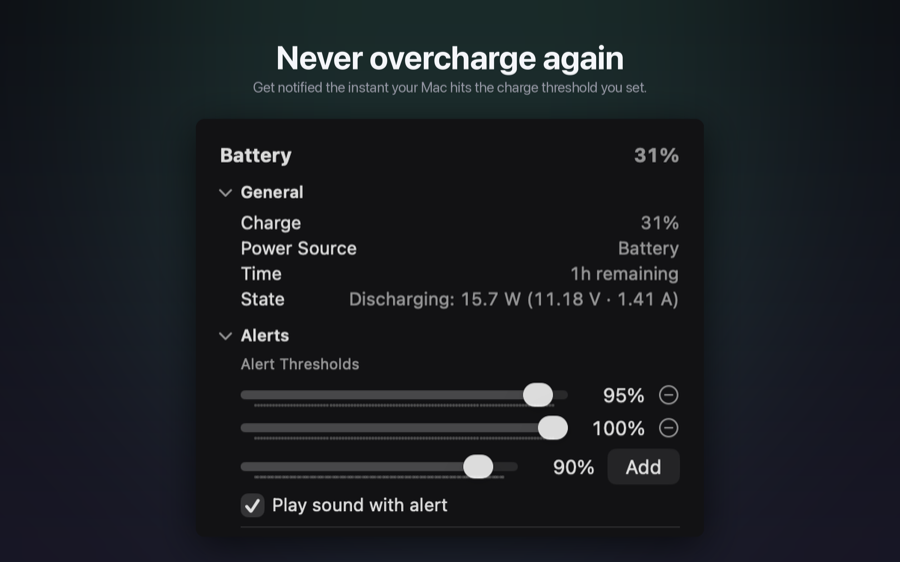
Configurable alert levels with simple sliders. Defaults to 95% and 100%, or pick any percentage.
Native notifications
A standard macOS notification fires while you are plugged in, right when you hit your level.
Optional alert sound
Turn on a sound if you tend to miss banners, or keep it silent.
Resets on unplug
Thresholds re-arm automatically every time you unplug, so the next charge just works.
Built for macOS
Written in SwiftUI and matches your system theme, including Liquid Glass on macOS 26.
How it works
Glance at the menu bar
Your battery percentage and a charging bolt live right next to the clock — no need to open the app.
Set your thresholds
Pick when you want to be notified. Defaults to 95% and 100%, or set any percentage you like.
Get notified, then unplug
A native macOS notification fires while you're plugged in. Unplug, and thresholds reset for next time.
Questions, answered
How much does it cost?
$0.99, once, on the Mac App Store. No account and no subscription.
Does it run in the background?
Yes. It lives in the menu bar with no Dock icon and uses very little power.
Can I choose my own alert levels?
Yes. Set any percentage with the sliders. The defaults are 95% and 100%.
Does it collect my data?
No. In-app analytics are off by default and only turn on if you opt in.
Stop guessing when to unplug.
One-time purchase. No account, no subscription.